
1. Build an intraday momentum chart (use case)
Goal: fetch intraday candles for a symbol, calculate a fast/slow rolling mean, and render a simple chart you can share with a trader or analyst.
import os
import pandas as pd
import matplotlib.pyplot as plt
from sahmk import SahmkClient

client = SahmkClient(api_key=os.environ["SAHMK_API_KEY"])

series = client.historical(
    "2222",
    from_date="2026-05-01",
    to_date="2026-05-15",
    interval="60m",
)

rows = getattr(series, "data", None) or series.get("data", [])
df = pd.DataFrame(rows)
df["timestamp"] = pd.to_datetime(df["timestamp"])
df = df.sort_values("timestamp")
df["ma_fast"] = df["close"].rolling(5).mean()
df["ma_slow"] = df["close"].rolling(12).mean()

plt.figure(figsize=(10, 4))
plt.plot(df["timestamp"], df["close"], label="Close")
plt.plot(df["timestamp"], df["ma_fast"], label="MA(5)")
plt.plot(df["timestamp"], df["ma_slow"], label="MA(12)")
plt.title("2222 Intraday Momentum (60m)")
plt.legend()
plt.tight_layout()
plt.savefig("intraday-momentum.png", dpi=140)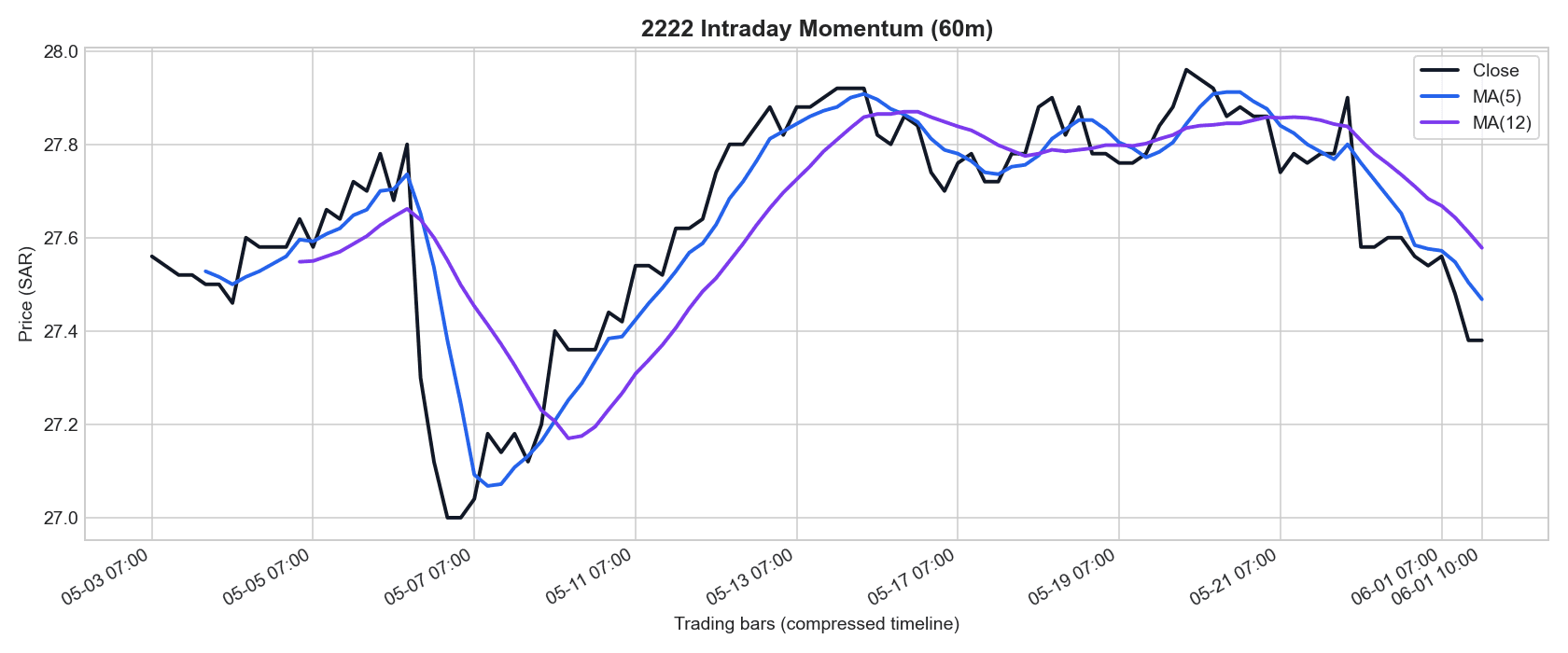
Example output generated from real intraday data.
2. When to use intraday vs daily
Intraday candles are ideal for short-term signal checks, session momentum tracking, and execution timing. If you only need medium/long-term context, daily candles are usually enough and cheaper to process.
- Intraday intervals:
30m,60m - Daily/aggregated intervals:
1d,1w,1m - Intraday availability depends on plan and date window limits
3. Python SDK setup
Install or upgrade first so your client supports newer interval options.
pip install -U sahmkimport os
from sahmk import SahmkClient
client = SahmkClient(api_key=os.environ["SAHMK_API_KEY"])4. Fetch intraday candles with SDK
Start with a bounded window and one symbol. Then scale symbols and run cadence.
# 30m candles for Aramco in a fixed date range
series_30m = client.historical(
    "2222",
    from_date="2026-05-01",
    to_date="2026-05-15",
    interval="30m",
)

# 60m candles with same shape
series_60m = client.historical(
    "2222",
    from_date="2026-05-01",
    to_date="2026-05-15",
    interval="60m",
)

# Safe extraction for both typed and dict-like responses
rows = getattr(series_30m, "data", None) or series_30m.get("data", [])
latest = rows[-1] if rows else None
print("rows:", len(rows))
print("latest:", latest)rows: 78
latest: {'timestamp': '2026-05-15T14:30:00+03:00', 'open': 27.1, 'high': 27.2, 'low': 27.0, 'close': 27.15, 'volume': 452112}If your local SDK version expects different date argument names, upgrade first and re-run:pip install -U sahmk
5. Fetch intraday candles with MCP prompts
In Claude/Cursor, keep prompts explicit about interval, date window, and output shape.
Prompt
Use get_historical for symbol 2222 with interval 30m from 2026-05-01 to 2026-05-15.
Return count, first timestamp, last timestamp, and latest close.
Prompt
Fetch 60m candles for 2222 over the last 10 trading days.
If the plan limit blocks this interval/window, retry with the closest supported range and explain what changed.
Prompt
Compare last 5 completed 30m candles for 2222 and 1120.
Show symbol, candle timestamp, close, and volume in a compact table.
These prompts call get_historical. Include fallback instructions in the prompt so the agent can degrade gracefully under plan constraints.
6. Plan guardrails and reliability tips
- Keep intraday requests scoped (symbol + narrow date window).
- Handle plan-limit responses and auto-fallback to supported interval/window.
- Treat the latest bar as potentially in-progress near session boundaries.
- For tick-like realtime reactions, move to WebSocket streaming.
7. Next steps
- →Continue with Real-time WebSocket tutorial when you need live push updates.
- →Keep the API docs open to validate interval and plan expectations.
- →Use Data Center to export structured historical datasets for reporting and model inputs.
- →Use the MCP setup tutorial if your agent is not yet connected.
Resources
Build faster with intraday data
Start with bounded intraday windows in SDK or MCP, then scale to production monitoring and real-time streaming when needed.